A mechanical gate on the manufacturer's own bottle releases one tablet per tilt, and two sensors record that it left. The data path, the device line-up and the four builds.
01
Mechanism
01.1
Tilt, Release, Record
1
Tilt the bottle. The gate isolates a single tablet.
2
One tablet leaves. The gate closes behind it.
3
The event is timestamped as the tablet leaves — not when a cap opens.
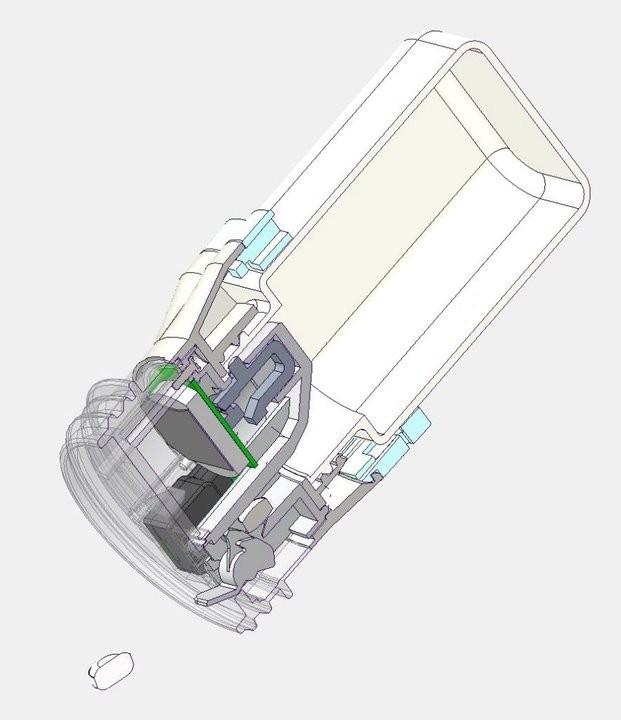
No motor and no power in the release itself: the gate is moved by the tilt, and the sensors only watch it. Strip the electronics and the gate still releases one tablet.
Dispensing a tablet
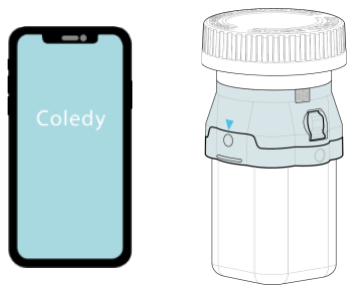
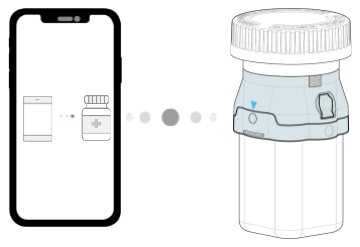
①Open the Coledy app. Place the phone next to the device.
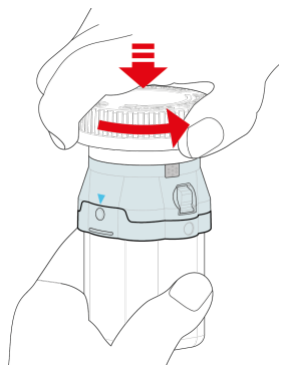
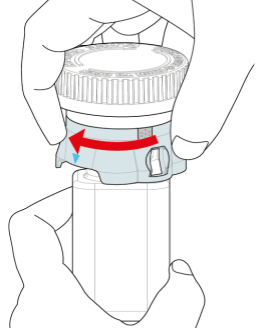
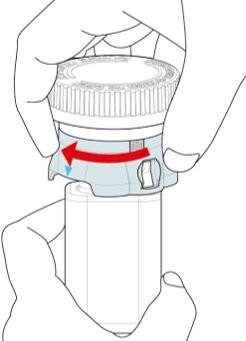
②Push down and turn the cap counterclockwise to open.
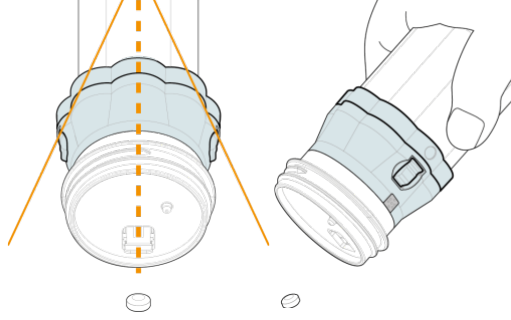
③Gently tilt the bottle and wait for a tablet.
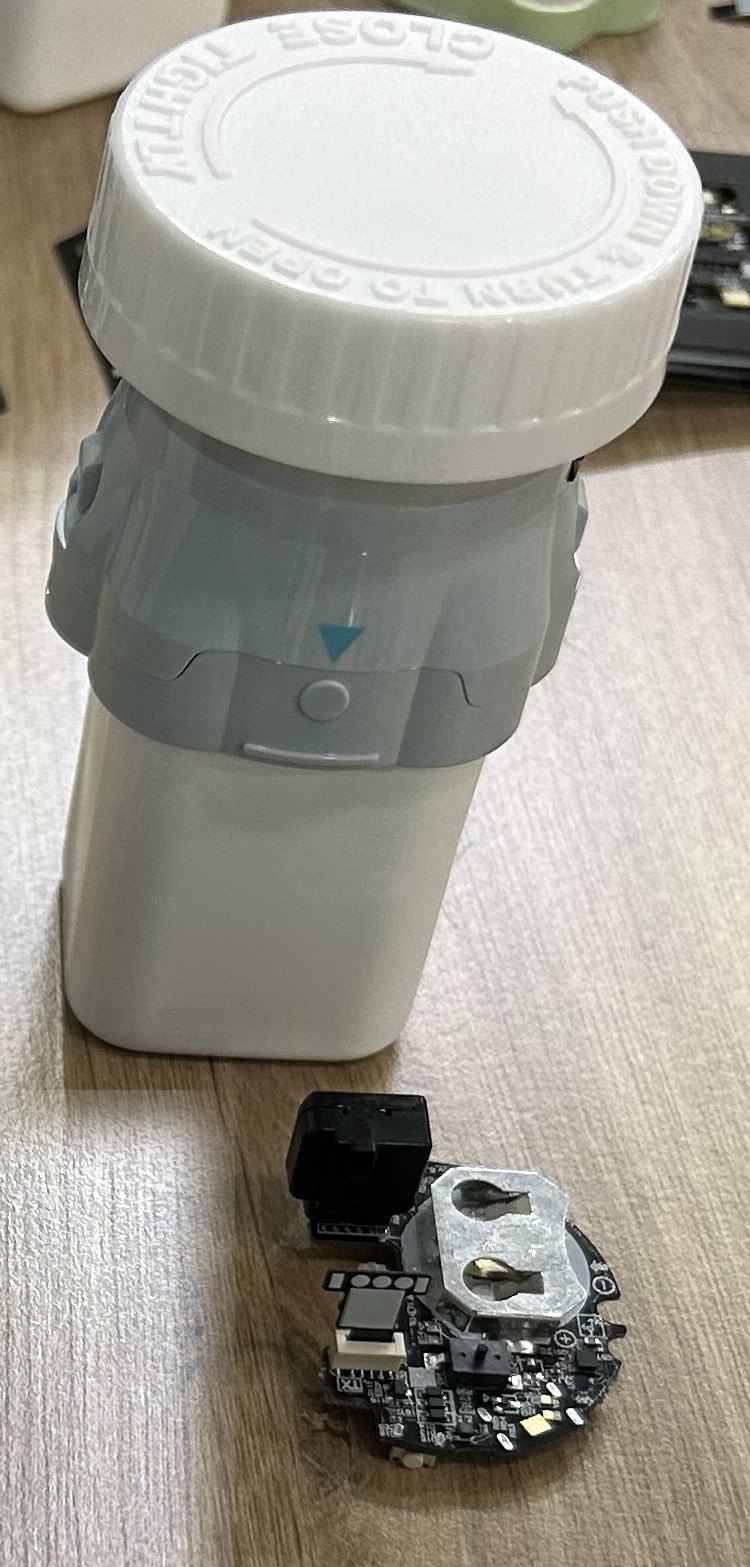
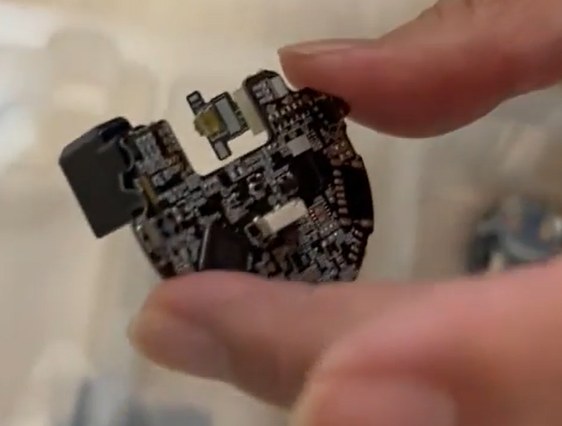
The add-on and its electronics — one small circuit board.
One Tilt Releases One Tablet — Two Sensors Prove It
Gravity-driven dispensing
One-tablet mechanical dispensing through a gravity-driven gate valve
The standard tilt-to-dispense motion releases one tablet — no motor
Valve geometry is calibrated to the target tablet
The dose signature
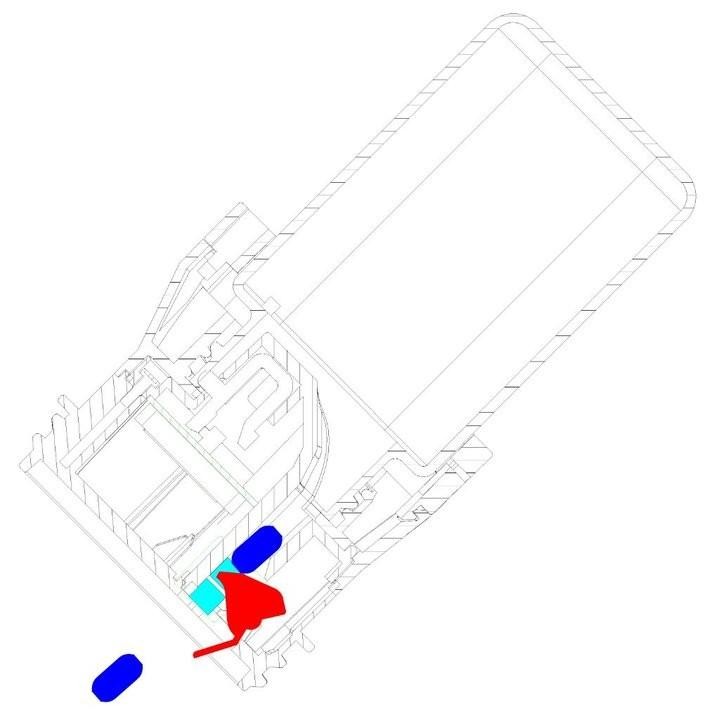
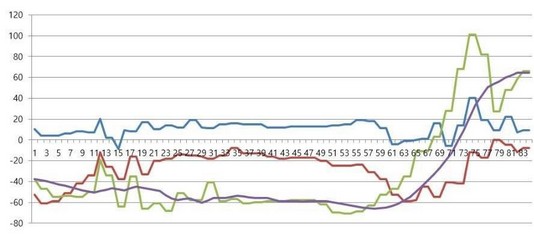
Two IR emitter–receiver pairs capture each tablet pass; an accelerometer records the tilt
The waveform is classified as a single-tablet pass event
Event and UTC time go to app and server, tamper-evident, synced when back online
Real-time verification
Captures the exact moment the tablet passes
Single-Tablet Physical Verification (STPV): IR sensors, with an accelerometer for the tilt
Add-on and child-resistant
Fits standard commercial pharma bottles
Snaps onto a CR-certified device
No tablet transfer when the bottle changes
IR light-block and tilt, recorded as one tablet passes: the dose signature.A verified dose event appears in the app as the tablet leaves the bottle.
01.3
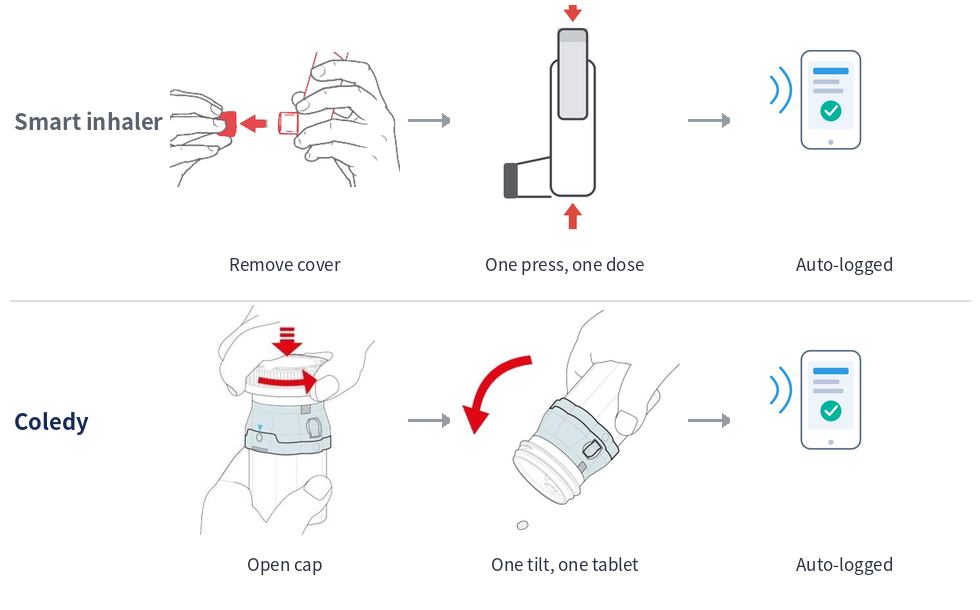
One Press, One Spray — Now One Tilt, One Tablet
Same gesture, same logging. The difference is what the package portions, and what the log can prove.
Same three steps. The inhaler's valve portions the dose; on a bottle, the add-on has to create the single-tablet event.
1
Remove cover → one press, one dose → auto-logged
Smart inhaler. A metering valve releases a fixed volume per actuation, so the add-on only has to detect the press and time-stamp it.
2
Open cap → one tilt, one tablet → auto-logged
Coledy. A bottle portions nothing, so the add-on has to create the single-tablet event and verify it — closer to a dose, though not proof of swallowing.
Category
Smart inhaler
Coledy Pro
Sensing
Pressure and flow sensor
Single-tablet detection
Precision
Metered actuation
Physical single-tablet dispensing
Output
Actuation estimate
Dose-level verified log
02
App & data
02.1
Pair Once: Automated Real-Time Dispense Tracking
Pair once, then it records itself — the device holds each dispense until a paired phone or watch is in range.
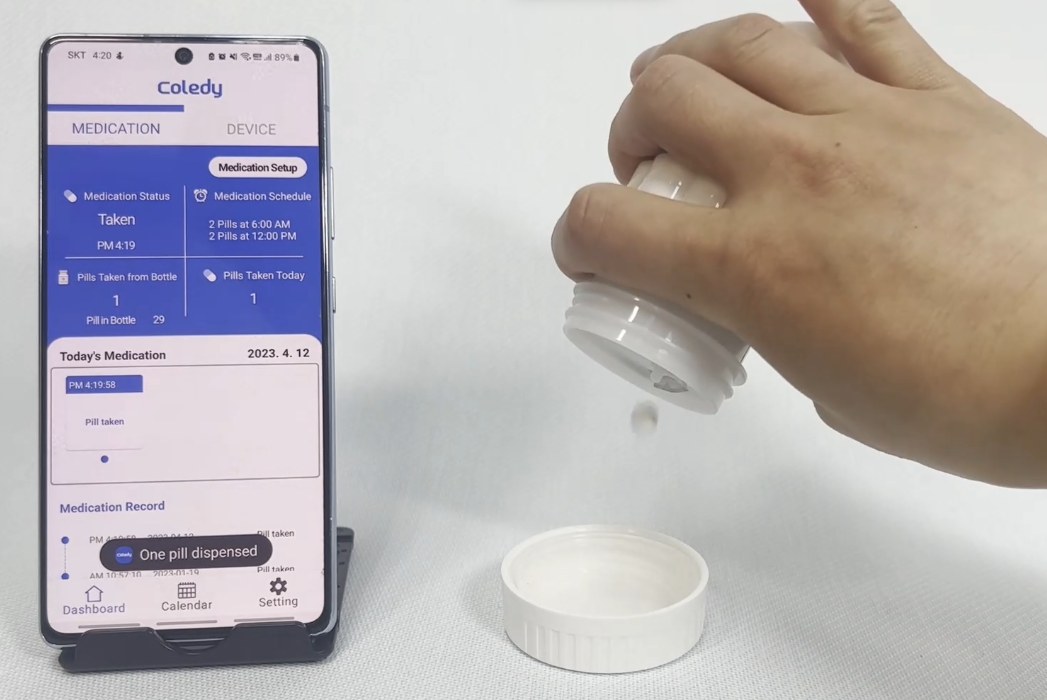
Both field studies found the same shape: a learning curve at first use, then daily use that needs no extra step at the dose. The dispensing photo is the tooled valve build.
The Coledy Connect must be paired with a compatible Bluetooth mobile device to sync stored usage data. Download the Coledy app, and make sure Bluetooth is on.
Pairing the device
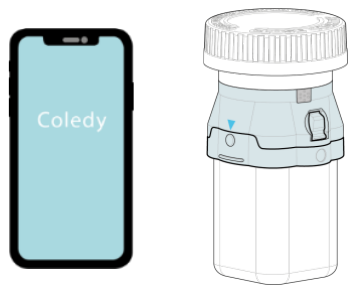
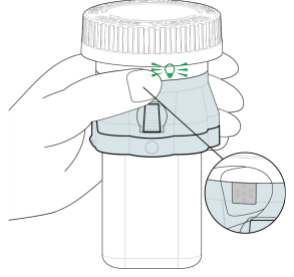
①Log in to the Coledy app and place the device next to the phone.
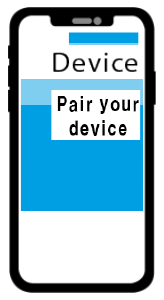
②Tap ‘Pair your device’ to enter pairing mode.
③Press and hold the pair button for 3 seconds — the LED flashes green; red if pairing failed.
④Pair the device by following the on-screen instructions.
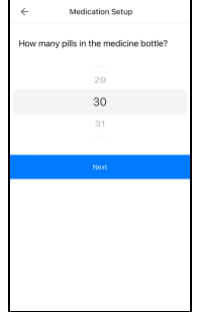
⑤Follow the prompts to set up the new medication.
Section: the gate releases one tablet; the sensors see it leave.
02.2
Moving to a New Bottle
At each refill the device moves to the new manufacturer's bottle. The tablets never leave their original bottle, and the app recognises the new one.
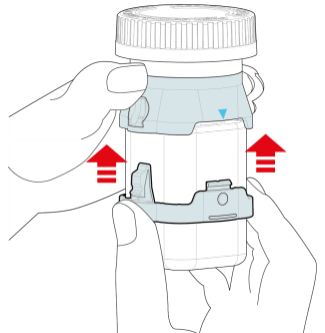
Open the Coledy app, release the belt, lift the device off the empty bottle, then attach it to the new one.
Attaching a new medicine bottle
Install the medication
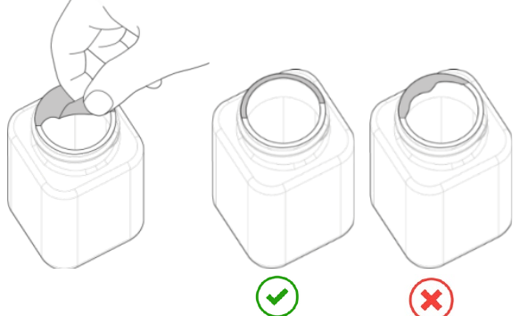
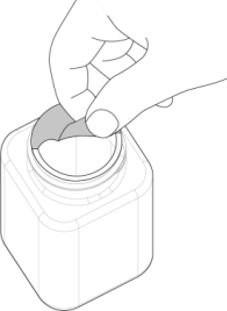
①Remove the foil seal from the medicine bottle.
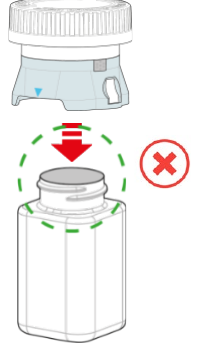
②Attach and rotate the device onto the new bottle.
③Do not attach the device while the foil seal is on.
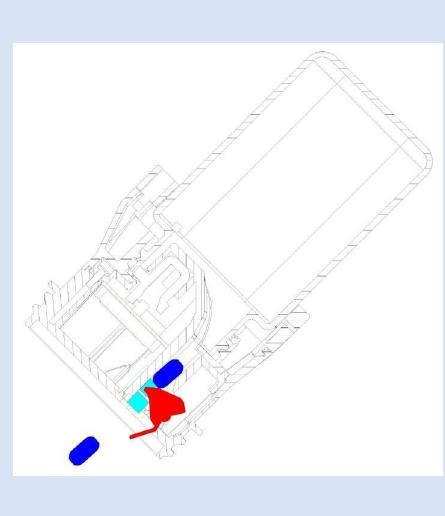
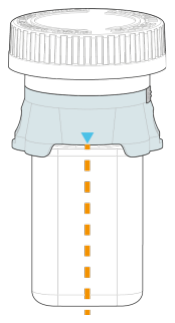
④Align the blue triangle with the centre of the bottle.
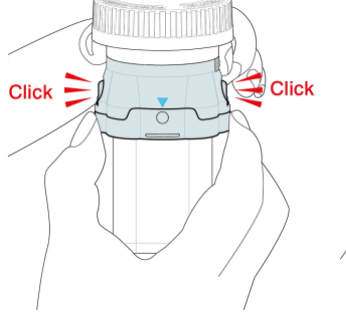
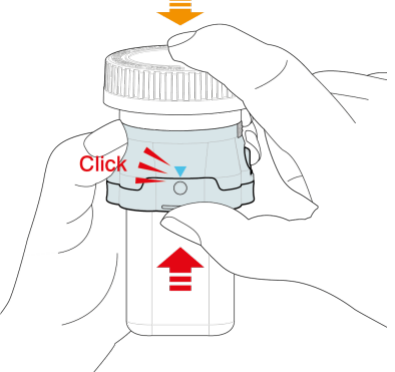
Attach the belt
①Align the round button with the triangle and push the belt up until it is secured.
②A click when the belt is secured.
③Push the bottom of the belt up — a click when it locks.
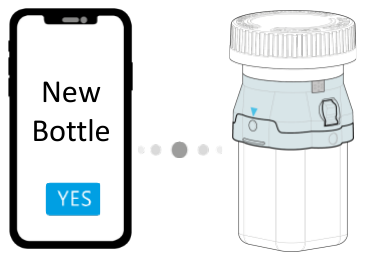
Set up the new medication
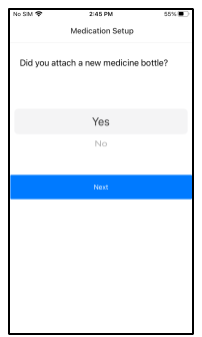
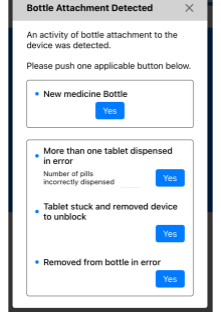
①The app detects that a new bottle has been attached.
②Press ‘Yes’ under ‘New medicine Bottle’.
③Follow the prompts to set up the new medication.
02.3
Data Pipeline: Seamless Connected Infrastructure
A closed loop — the payer owns and controls the data; the licensee runs the pipe on Coledy's reference software.
1
Patient app
Captures verified dispense evidence and real-time adherence alerts.
2
Cloud
Computes verified adherence per dose event and builds the real-world data asset.
3
Payer / hospital web
Each payer sees only its own patients' data.
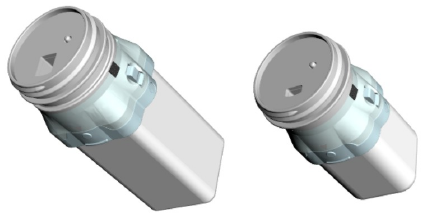
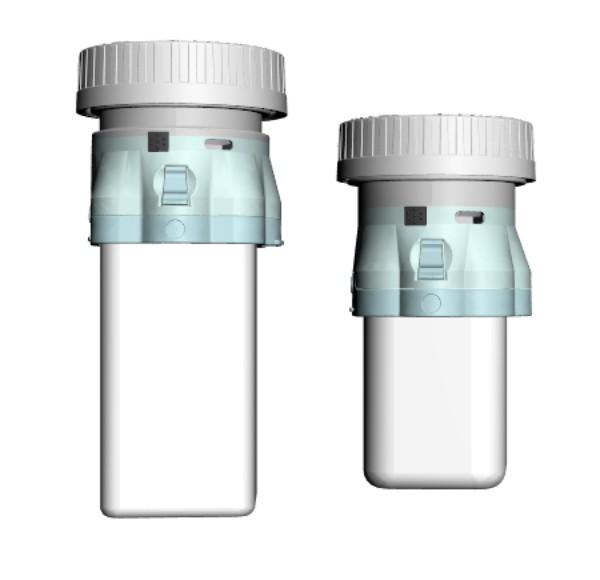
Patient device on two opening sizes
Data ownership • Ownership and control: fully retained by the payer — insurer, pharma or government. • The licensee builds and runs the infrastructure from Coledy's reference app and server.
Built and run in the field: the patient app, the admin server and the monitoring web, with hospital monitoring at a major university hospital.
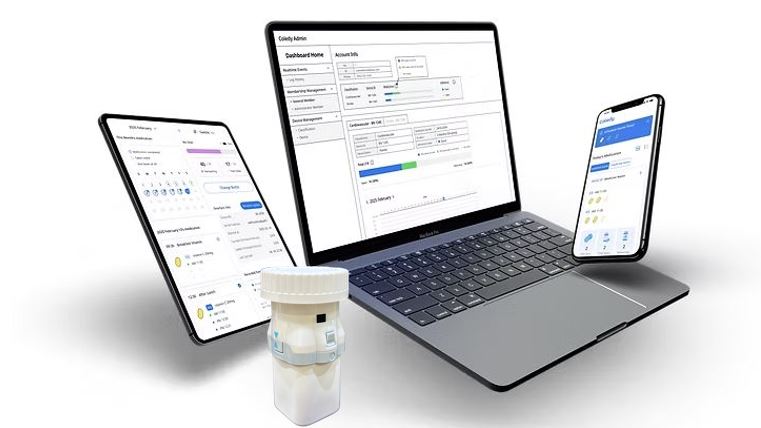
Web monitoring — the admin view
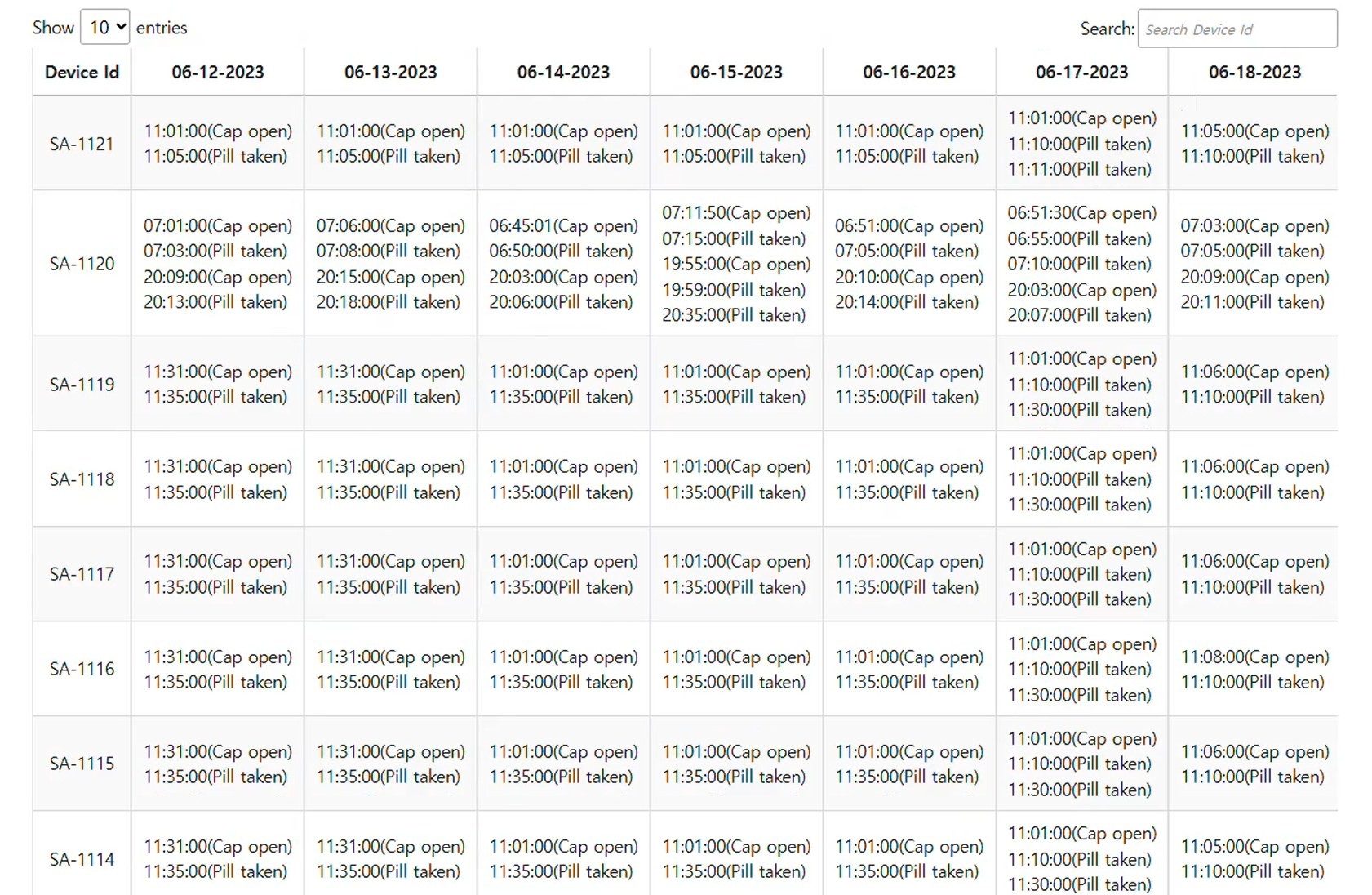
Calendar view: every cap opening and every dispense, per device, per day, with its time.
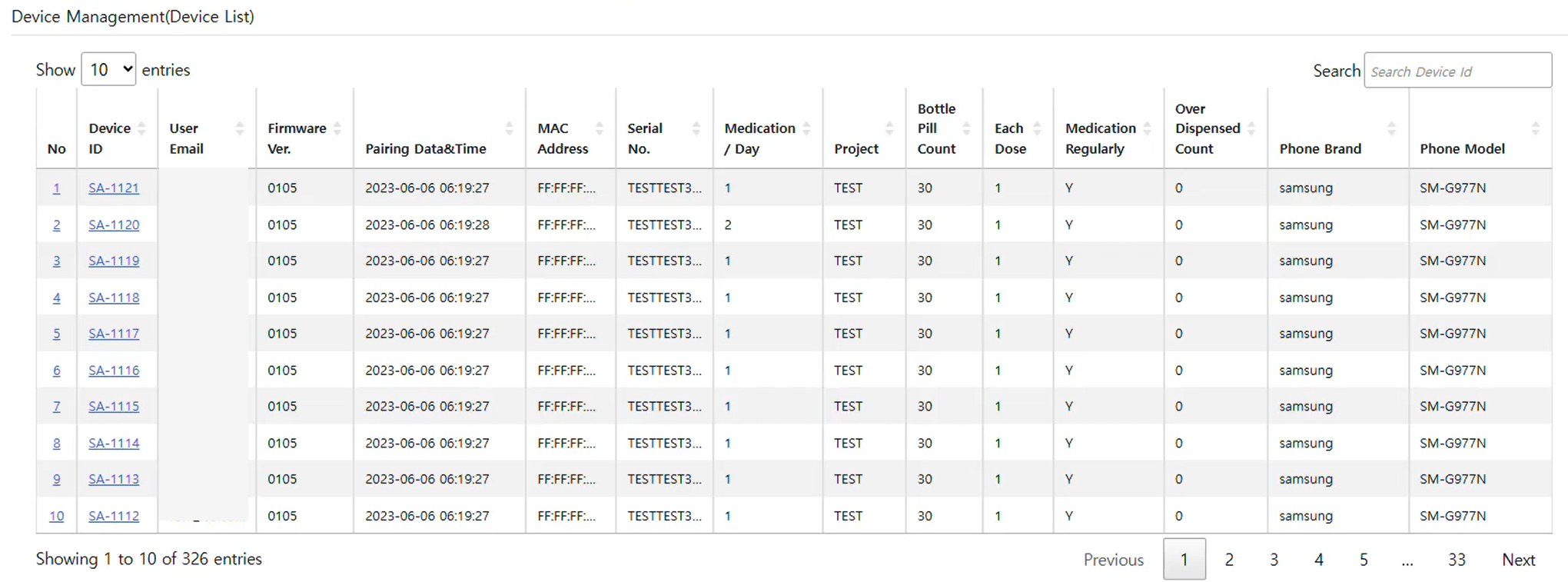
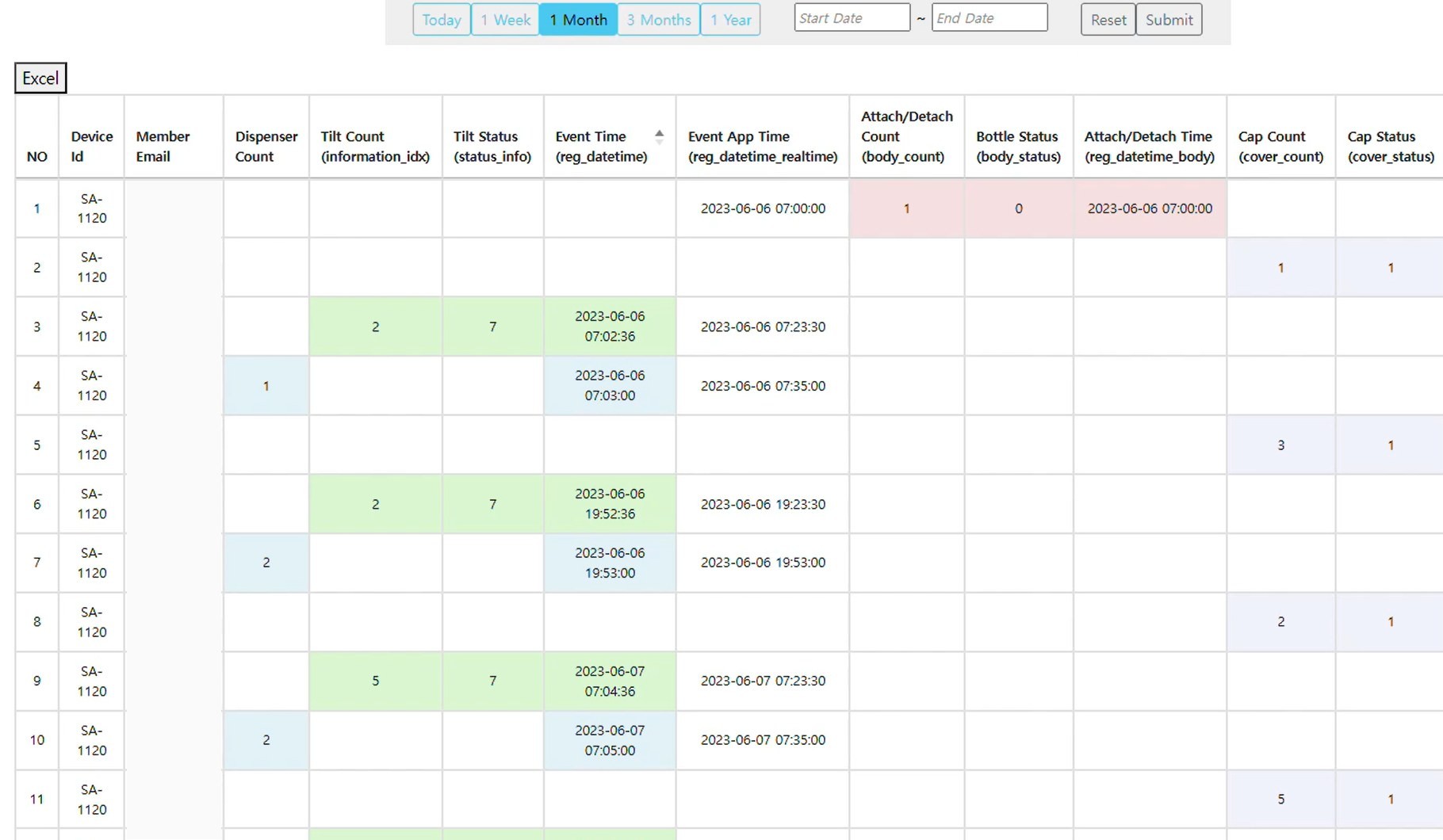
The admin web shows each device day by day, the device list with its regimen and settings, and the raw event log behind every figure — exportable for analysis.
Device list: firmware, pairing time, regimen, bottle count, over-dispensed count, phone.Raw event log: dispense count, tilt events, bottle attach / detach and cap events — each with device time and app time, exportable.
02.4
One Device per Drug, One Data Boundary per Payer
A three-drug patient carries three devices — and each drug's data stays separate from the others.
01
Devices scale per drug
Every tracked bottle gets its own add-on, tooled to the tablet — one drug, one device, counted as treatments, not people.
02
The app layer is the partner's choice
The record does not require the Coledy app. An SDK puts it inside whichever surface the programme owns — a pharma app, a payer or provider app.
03
The boundary is the programme
Each programme sees its own drug's dispense events, nothing else. Per-tenant isolation, encrypted end to end; the patient authorises each recipient.
SDK, patient app, server and admin web were built and exercised in pilot. Separation across programmes is designed and not yet run with two live programmes at once.
02.5
Designed for Daily Use at Home
The device and app are built around how people on long-term tablets actually live — a routine, a phone nearby, and someone who cares whether the dose happened.
Easy to hold, built to last
A full-hand grip that suits people with limited dexterity, in a body made to be carried in a bag and survive a drop.
Set up without help
A step-by-step illustrated guide; the patient attaches the device and changes bottles at home.
A reason to open the app
Dose reminders that fit the patient's routine — the feature that brings people back every day.
Visible to a carer or doctor
With the patient's consent, the record can be shared so someone can step in when dispensing stops.
Refill from the count
The device knows how many tablets are left — the basis for refill alerts and repeat-prescription links.
Nothing lost offline
Sync starts when the cap opens; events are stored on the device until the phone is in reach, then backfilled.
03
Product line
03.1
Scalable Device Lineup: Pro & Universal Tiers
One Platform, Two Tiers: Evidence Grade and Reach Grade
Same module, same sensor PCB. Pro carries contract-grade verified dose data; Universal is the entry and consumer tier.
Pro · precision path
Universal · reach path
Gate
A precision valved gate releases and senses exactly one tablet at a time.
Open channel, no valve — simpler to build, and takes any unit that fits.
Sensing
STPV: IR sensors verify each tablet as it leaves the bottle; an accelerometer records the tilt.
RRE: every dispense is logged; extras go back through the opening on the supplied tray, and the app corrects the count.
Strength
Dose-level precision adherence data — the evidence payers and pharma pay for.
Deploys on any bottle the fitment covers, with no tablet tooling — the entry route.
Power
Single-use battery rated for one year, or a rechargeable option.
Rechargeable battery.
Shared Platform Both tiers share the same module and sensor PCB, and each ships in two opening sizes · real-time sync · pharma-compatible · US 16 CFR Part 1700
03.2
Two Modules Cover Four Builds
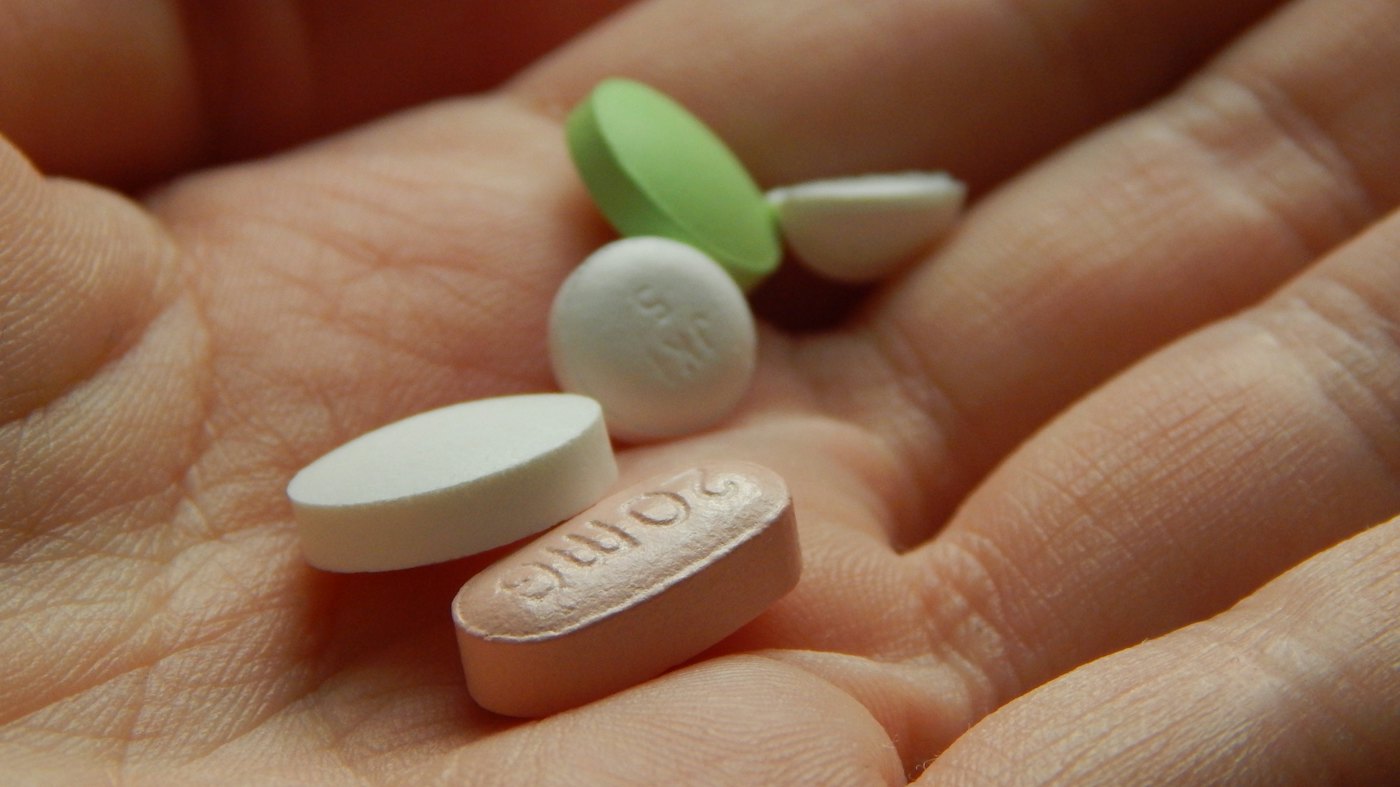
Stock photo
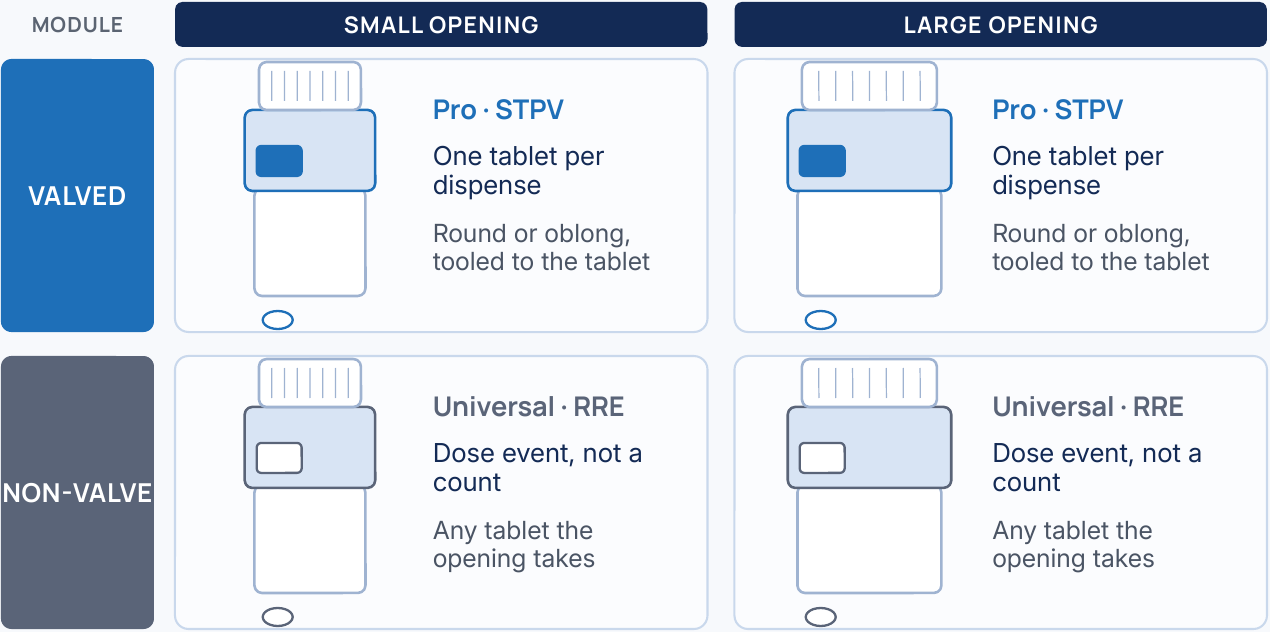
One module per opening size — within each, the only variable is whether a valve sits in the opening.
The valved row is the lead product — verification is what is licensed; the non-valve row is the entry and consumer configuration.
Module
What it records
Tablet
Openings
Pro · STPV
One tablet per dispense
Round or oblong, tooled to the tablet
Small and large
Universal · RRE
Dose event, not a count
Any tablet the opening takes
Small and large
Two modules, two opening sizes — four builds.
STPV is Single-Tablet Physical Verification; RRE is Return Reconciliation Event. US: a medication reminder is FDA product code NXQ under 21 CFR 890.5050 — Class I, 510(k) exempt and GMP exempt except for records and complaint files.
03.3
Two Electronic Builds, on Camera
The same gate, carrying its sensors two ways: fitted onto the bottle, or set inside the opening.
Left · Add-on electronics
Fitted onto the bottle. Shown with a large oblong tablet — the build used in the hospital field run.
Right · Insert electronics
Set inside the bottle opening. One tablet per tilt, recorded as it leaves.
03.4
Gate only, no electronics
The single-tablet gate is mechanical. Without sensors it is a dispenser in its own right — for medicines and supplements where no record is needed, and as the part that makes the mechanism ordinary.
The mechanical gate on a pharmacy vial, and in a single-dose body.
Ceiling valve — a newer gate
A newer gate with the valve above the tablets instead of below them. Simulations of two builds, and a hand-held prototype.
Silent clips — our own footage and simulations.
04
Data integrity
04.1
A Correction Never Overwrites the Sensor
The path depends on whether the device sensed it — and the sensor's record is never edited by either.
99.8%of dispenses sensed correctly, measured in a pharma protocol. The two paths below are for the remainder — and for the tablet that never should have come out.
The sensor counted it, and the tablet went back
The valve released a tablet that should not have come out. The app can ask first, because something physical happened.
An extra tablet comes out and is counted
The patient lifts the device off and puts it back in
Lifting off is itself an event the device sees
On re-attachment the app asks how many went back
The sensor did not see what happened
A tablet came out uncounted, or one release was counted twice. The patient has to start it, so this path has to be easy to find.
Nothing was lifted off, so there is no event
The patient opens the correction menu
Enters how many actually came out
The count moves until it matches
Machine record
What the sensor saw, with its own timestamp. Immutable. This is the evidence.
Correction record
What the patient entered, kept as its own entry. It adjusts the reported count — it does not rewrite the sensor.
Both, together
The pair goes into analysis, and the correction pattern is itself a signal.
Why a regulator cares A corrected figure is the machine record plus a correction entry, never a replaced number — so the audit trail survives the correction, and a reviewer can always see what the device itself reported.
Correction paths, dialogs and admin-server fields as shipped. Dispensing-error rates are deliberately not stated here: no characterisation protocol has been run, so no denominator exists to quote.
04.2
A Sensed Dispense Drives the Reminder and the Record
Device senses, app compares against plan, platform keeps the events — one loop.
1 · Detect
The device is the only point in the chain that sees a tablet leave the bottle in real time.
Each sensed dispense timestamped — at the device and again at the app
Re-attachment raises a dialog that classifies the exception
The patient's count corrects in either direction
2 · Remind
The reminder is not a timer. It reads the plan against the verified count before it fires.
Fires only if the planned dose has not been dispensed by reminder time
Silent once the dose is met
Over-count and extra count feed the same judgement
3 · Report
The excess is a first-class field, not a note buried in a log.
Over-dispensed count per bottle and cumulative
Beside dispense, tilt, cap and attach events, with both timestamps
Exports with the rest of the record
The device does not physically block a dose, and is not designed to. Locking a patient out of their own medicine raises device-classification, liability and autonomy questions, and on a bottle add-on it is defeatable. Alert and inform.
Next, in order of intervention The excess warning is that same comparison inverted — fire when the verified count exceeds the plan rather than falls short, not a new subsystem. Then a caregiver notification on a defined threshold, then a supply-depletion flag — taking extra empties the bottle early, so the refill date stops matching the plan, which a payer or pharmacy can act on without any clinical judgement.
04.3
The Dose Events Behind pPDC Are Kept, Not Aggregated Away
pPDC is computed from the underlying dose events and never replaces them — any figure traces back to the events behind it.
Four sensors, four event classes
IR pair, accelerometer, bottle-attach and cap sensors each raise their own row. A tilt that released nothing is a tilt, not a dose — the distinction a cap sensor cannot make.
Two clocks on every row
Device time is when the sensor fired; app time is when the phone received it. The gap between them is itself a signal — how long the patient went before opening the app.
Nothing is pre-aggregated
The score is computed from the stored events, so a disputed figure can be shown against the record behind it. Coledy does not edit it.
A development view of the raw event store, one device, with account and device identifiers removed. What a partner sees is their own programme’s view, built on the same events.
Inquiries
For licensing, partnership or investment inquiries, please write to the address for your area.